
Killer social media hooks are what stop the scroll and turn casual viewers into engaged readers.
If you publish thoughtful posts but get single-digit views, you’re not alone.
This guide gives you testable hooks, caption swaps, a 30-day plan, and a free 32-point checklist to turn views into leads.
Start with one strong hook today.
Table of Contents
- Why the First 3 Seconds Matter
- The 5 Elements of Viral Hooks
- 10 Copy-Paste Hooks You Can Use Today
- How to Test a Hook in 24 Hours
- Caption Swaps: Instead-Of → Try-This
- Content Planning: 30-Day Prompt & Calendar
- Tools for Content Creation
- Case Studies: Hook Swap Before & After
- Pre-Post Planning Checklist
- Quick Action Steps
- Resources & Swipe Files

Why the First 3 Seconds Matter ⏱️
Mobile viewers decide fast.
Your format and opening sentence must work on small screens.
Research shows a sizeable share of viewers drop out within the first seconds.
That means your opener is your audition.
✅ Short, bold, and specific openers increase retention
✅ Use a pattern-interrupt or curiosity gap in the first line
✅ Follow with one immediate value promise
If your first line confuses or feels generic → people scroll past.
Make the opening sentence compact and test one variant quickly.
The 5 Elements of Viral Hooks

1. Pattern-Interrupt 🔄
Example: Replace “How to grow your audience” with “I quit posting daily, and my engagement tripled.”
→ Try this now: start with a sentence that violates expectations.
2. Curiosity Gap 🤔
Example: “This one mistake cost me $4,700.”
→ Try this now: name the result and leave a clear gap.
3. Emotional Trigger 💔
Example: “If you have ever felt invisible, this is for you.”
→ Try this now: lead with empathy that matches your audience.
4. Specificity 🎯
Example: “From 200 to 50,000 followers in 4 months.”
→ Try this now: add exact numbers or timeframes where possible.
5. Social Proof ✅
Example: “I asked 100 CEOs their #1 productivity hack.”
→ Try this now: add credible numbers or authority references.
10 Copy-Paste Hooks You Can Use Today
1. You’re doing this wrong, and it’s costing you
→ Best for: LinkedIn, blog intros
→ Realtor tweak: “You’re doing this wrong, and it’s costing you sales.”
2. I quit daily posting, and my engagement tripled
→ Best for: Personal stories
→ Photographer tweak: “I quit daily posting, and clients doubled”
3. This one mistake cost me $4,700
→ Best for: Case studies
→ Consultant tweak: “This one mistake cost my client $4,700.”
4. I tested 5 tools—only 1 worked, here’s which
→ Best for: Tools posts
→ Small biz tweak: “I tested 5 social tools—only 1 saved me 10 hours.”
5. From 200 to 50,000 followers in 4 months—here’s how
→ Best for: Growth stories
→ Marketing tweak: “From 200 to 50K followers in 4 months for my client.”
6. Stop posting more, do this instead
→ Best for: Action-driven hooks
→ Realtor tweak: “Stop listing more, do this instead.”
7. This $15 product outperformed $300 brands, here’s proof
→ Best for: Product claims
→ Creator tweak: “This $15 tool did what paid tools couldn’t.”
8. I asked 100 people their #1 [topic], here’s what they said
→ Best for: Crowdsourced hooks
→ Local biz tweak: “I asked 50 local buyers their top need.”
9. If you’ve ever felt invisible, this one’s for you
→ Best for: Emotional hooks
→ Service pro tweak: “If you’ve ever lost a client, this one’s for you.”
10. The editing mistake that killed my channel, and how I fixed it
→ Best for: Behind-the-scenes
→ YouTube tweak: “The editing flaw that killed my shorts—and how I fixed it.”

How to Test a Hook in 24 Hours (Mini A/B Guide) 📊
Step 1: Write three clear variations that emphasize different elements
Step 2: Post the same content with each hook (keep everything else identical)
Step 3: Measure three primary metrics over 24 hours:
- 3-second retention
- 10-second retention
- Saves or shares
Step 4: Choose the winner using these rules:
→ At least 20% higher 3-second retention
→ OR 15% higher 10-second retention
→ OR 2x saves
Step 5: If results tie, prefer the option with higher saves
Step 6: Log the winner in a swipe file and scale it into three formats
Caption Swaps: Instead-Of → Try-This

❌ Instead of: “Here are 3 tips for X.”
✅ Try this: “The 3-minute change that boosted X by 34%”
❌ Instead of: “How to save money.”
✅ Try this: “I cut my expenses by $847 in 30 days with 3 tools.”
❌ Instead of: “New post!”
✅ Try this: “This one tactic earned my client 10K followers in 21 days.”
❌ Instead of: “I hope this helps”
✅ Try this: “Try this today and report back one result.”
Each swap guides readers toward a measurable claim or curiosity gap.
Use these swaps in:
- Captions
- LinkedIn intros
- Micro-blogs
Include a clear CTA after one or two lines to direct action.
Content Planning: 30-Day Prompt & Calendar 📅
Use five category buckets:
- Educate
- Proof
- Behind-the-scenes
- Offer
- Community questions
Week One Example:
- Monday = Educate
- Wednesday = Proof
- Friday = Behind-the-scenes
- Sunday = Community question
Week Two Example:
- Monday = Tool tip
- Wednesday = Case study
- Friday = Q&A
- Sunday = Repurpose
Create a simple spreadsheet with columns: → Date | Hook | Primary Keyword | CTA | Link | Asset
This reduces decision fatigue and keeps testing consistent.
Tools for Content Creation (Beginner-Friendly) 🛠️
1. Editing Tool
What: Auto-cut editor that removes dead space
Why: Saves editing time and keeps viewers engaged
Quick workflow: Upload footage → Select length preset → Export short clip
2. Voiceover Tool
What: AI voice generator for polished narration
Why: Creates professional audio without a studio
Quick workflow:
Paste script
→ Select voice
→ Export audio
3. Visual Tool
What: Fast image generator for thumbnails and social cards
Why: Speeds thumbnail production and keeps branding consistent
4. Scheduler
What: Simple scheduler for consistent posting
Why: Maintains cadence without manual posting
Quick workflow: Schedule one week of posts each Friday
5. Repurpose Tool
What: Turns long-form content into bite-sized clips
Why: Creates more assets from one recording
Quick workflow: Import long video → Choose clip highlights → Export for social
Case Studies: Hook Swap Before & After 📈

Case Study A: Fitness Coach
Before: Generic opener → 800 views
After: “I trained 200+ clients—only 1 exercise works for fat loss.”
Result: 47,000 views after reupload with the same edit
Case Study B: Realtor
Before: “Lovely 3-bed home.”
After: “How this hidden feature sold this home in 3 days.”
Result: 9,400 views and 27 lead inquiries
Case Study C: Photographer
Before: “New session photos.”
After: “The portrait trick that doubled my bookings in 30 days.”
Result: 1 appointment → 12 booked sessions that month
Each case shows the hook change drove attention and created measurable business outcomes.
Each case shows the hook change drove attention and created measurable business outcomes.
What to Track Beyond Views:
✅ Inbound messages
✅ Booked calls
✅ Leads from each tested hook

The 32-Point Pre-Post Planning Checklist walks you through identifying exactly who you’re speaking to and what makes them take action.
When you know your ideal customer’s struggles, goals, and scroll-stopping triggers, your content converts—plain and simple.
Strategic targeting increases engagement by 300% and conversion rates by up to 73%. Click the download button below for instant access.
Other items cover: → Formatting
→ CTAs
→ Image optimization
→ Tracking windows
Use the checklist as a decision framework before publishing any post.
Download the full 32-point Pre-Post Planning Checklist to implement this process reliably.

Five Must-Do Items:
- Preview the first line on a mobile screen
- Ensure image crop works on feeds
- Add one line of social proof
- Confirm the CTA is visible above the fold
- Set a 24-hour test reminder
Treat the checklist as a pre-flight test so you can publish with confidence.
Guaranteed to Get More Views for Realtors 🏡
Realtors should use:
- Local specificity
- Urgency
- Social proof
Use: Neighborhood names, sold metrics, and short testimonial quotes in the opening line.
3 Guidelines for Mobile-First Real Estate Posts:
1. Always name a location and one concrete figure
2. Add urgency with a time window or limited offer
3. Pair the hook with a visual (property photo or quick map)
These tactics make listings stand out in feeds and local searches.
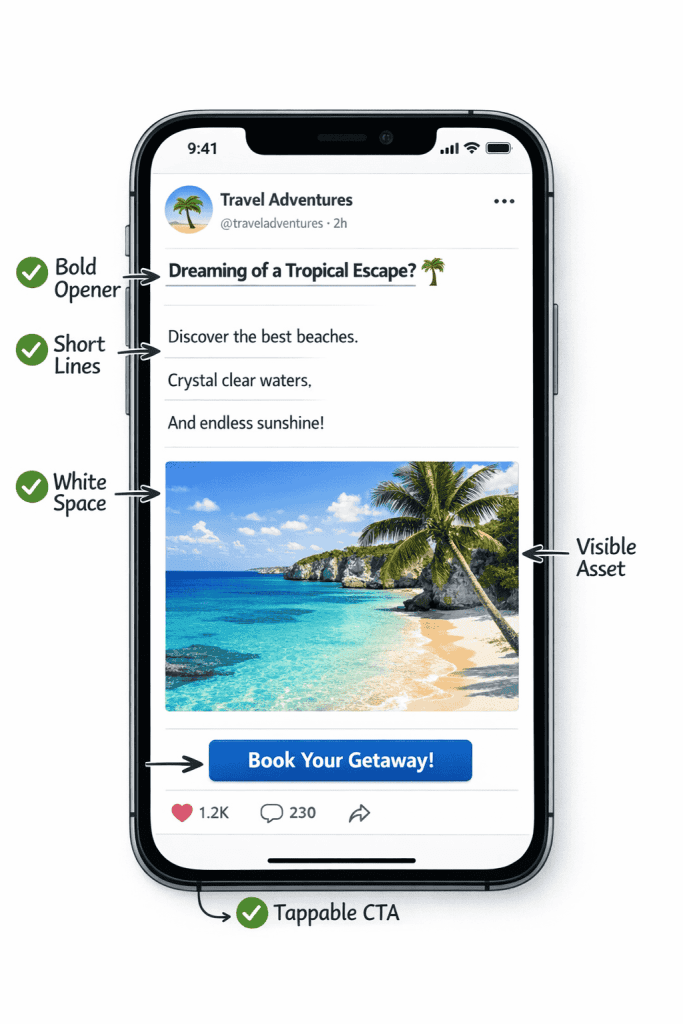
Follow These 3 Guidelines for Maximum Mobile Exposure 📱
Mobile-friendly posts need:
- Bold openers
- Short lines
- Tappable CTAs
Guideline 1:
Use a one-line hook and a single clear CTA above the fold
Guideline 2:
Format for quick scanning and add white space in captions
Guideline 3:
Include a visible asset (image or 3-second clip) that looks good on small screens
Quick checks before you publish to improve mobile retention.

Mobile-friendly posts need:
- Bold openers
- Short lines
- Tappable CTAs
Use Your Winning Data to Convert Content into Cash 💰
Turn views into leads by sharing simple numbers and a clear next step.
How to do it:
- Show before/after numbers
- Add one short customer story in the same post
- Include a CTA that invites: direct conversation, form fill, or link click
Use lead magnets that match the post theme:
→ Neighborhood report for realtors
→ Free audit for consultants
Matching the content to an appropriate offer shortens the conversion path.
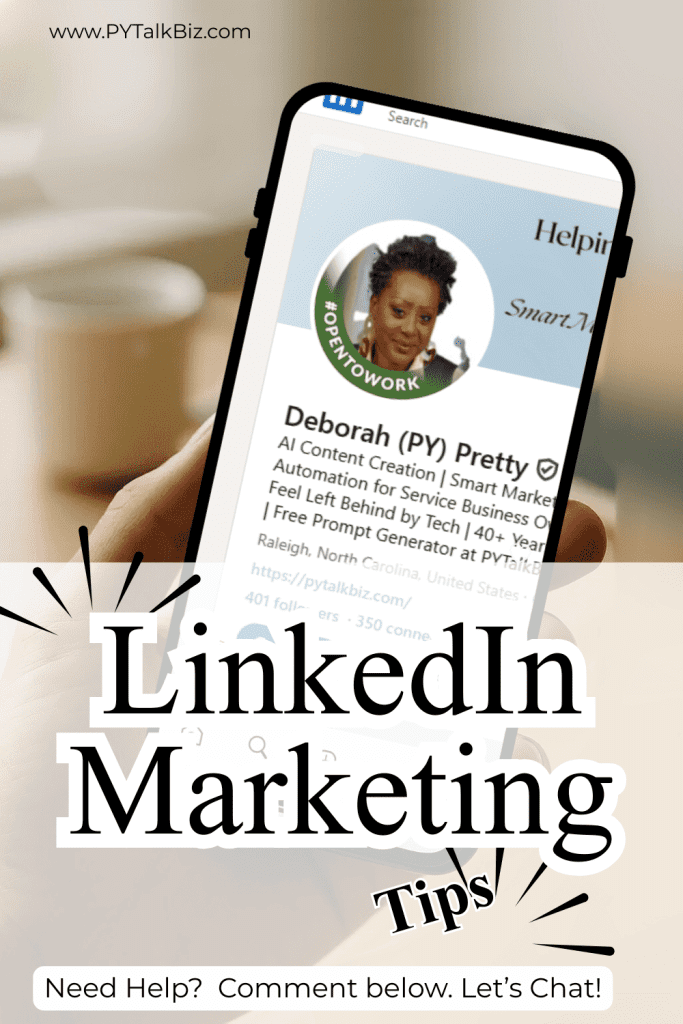
3 Must-Do Actions After Every LinkedIn Post
Action 1:
Engage the first 30 commenters with replies and follow-ups
Action 2:
Repurpose the post into a 30-90 second clip and a social card
Action 3:
Message saves and leads within 48 hours to convert interest
Doing these three steps turns passive views into active conversations and builds relationships.
How to Tag and What Tags Mean for Growth 🏷️
Tagging people, locations, and businesses expands reach and signals relevance.
Tag strategically:
→ Tag colleagues who contributed
→ Tag locations for local reach
→ Tag brands when relevant
❌ Avoid: Tagging random accounts (reduces authenticity and can lower engagement)
Use tags to connect posts to communities and to notify interested audiences.
1. “How I Fixed a Problem” Post
→ Four sentences, honest and specific
2. Client Micro-Case
→ Short before/after with numbers
3. Surprising Data Point
→ One stat and one clear takeaway
These formats invite comments, saves, and profile clicks.
Do These 3 LinkedIn Post Ideas to Boost Algorithm
Step 1: Write ten hooks now and save them in a swipe file
Step 2: Test three hooks in 24 hours and pick a winner
Step 3: Repurpose the winner into three formats and reuse the hook across platforms
Quick Action Steps ⚡
Step 1: Write ten hooks now and save them in a swipe file
Step 2: Test three hooks in 24 hours and pick a winner
Step 3: Repurpose the winner into three formats and reuse the hook across platforms
Resources & Swipe Files 📥
Download links:
- 50-hook swipe file
- Caption swap pack
- 30-day prompt calendar
- 32-point checklist
Each download includes sample hooks and a test template.
Use UTM tags on each pin to measure which ideas convert best.

Final Thoughts 💭
Your hook is your content’s promise.
Craft it first and build the post around it.
Download the free 32-point Pre-Post Planning Checklist to systemize this work.
👇👇Click on the image below!

Keep practicing—killer social media hooks will help your next post stop the scroll.

Nice breakdown of the topic.
Really enjoyed reading this. The points were explained clearly and without unnecessary jargon. Looking forward to more content like this.